CAA Gag Clause Confirmation of Compliance
The Consolidated Appropriations Act (CAA) of 2021 requires group health plans and health insurance issuers to submit gag clause prohibition compliance attestations annually. Select Health has completed a thorough review of its agreements to ensure compliance and has taken the following steps:
- Submitted the required attestation for Fully Insured and Level Funded customers
- Provided a Confirmation of Compliance for self-funded customers to support their own attestation process
Select Health agents may share the following branded documents with customers:
Select Health attests that the administrative services provided to self-funded customers comply with the requirements outlined in the Consolidated Appropriations Act, 2021 (PL 116-260), Division BB, Section 201: Increasing Transparency by Removing Gag Clauses on Price and Quality Information.
Action Required:
To ensure timely submission, self-funded client attestations should be submitted by December 11, 2026.
You may use the Confirmation of Compliance to support attestations for any Select Health-administered medical, pharmacy, and behavioral health services.
The Department of Health and Human Services (HHS) has provided a portal and instructions for issuers and customers to complete their attestation via CMS. Be sure to follow the instructions available on the CMS site.
Your Select Health representative may have already provided a copy of the Confirmation of Compliance.
Questions?
Contact your account manager or Select Health representative for assistance.
Updated letters accompanying member ID cards
Select Health recently updated the messaging that accompanies member ID cards. See samples below.
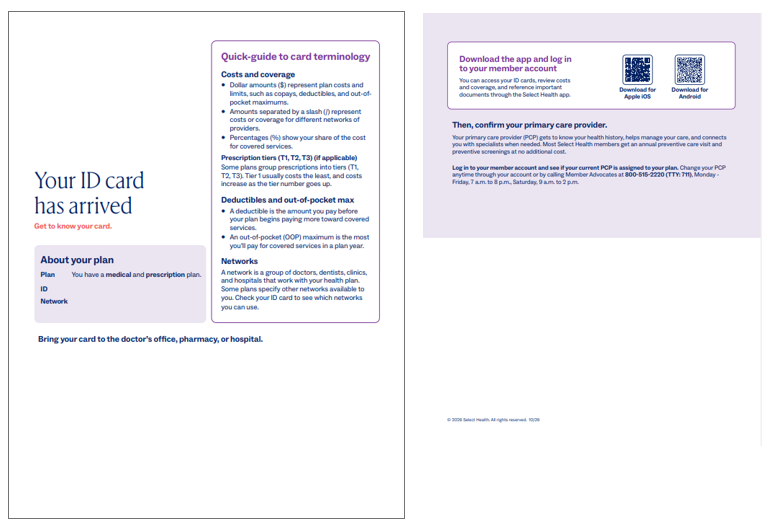
How you can help
As you support clients during enrollment and renewals, let them know that the letter accompanying their member ID card may look different from previous versions. Encourage clients to review the information included with their card and keep it for reference.
Large Employer
Retroactive termination time frame update
Effective January 1, 2027, retroactive termination requests for Large Employer groups will be limited to 90 days, better aligning processing with existing contracting language and helping avoid member disruption.. The contract language is not changing, but the time frame may differ from what some groups are accustomed to.
Large Employer terminations may be submitted retroactively for up to 90 days. Self-Funded groups are not affected and will continue to follow the six-month time frame.
Important year-end deadlines & reminders
Year-end deadlines can affect January coverage and your clients’ eligibility for certain benefits and incentives. Please review these important dates as you help clients prepare for the new year.
New ACA groups: participation & contribution requirements
New groups enrolling for a January 1 effective date that submit their enrollment no later than December 15 are not subject to participation or contribution requirements.
Submitting enrollment by December 15 can give eligible new groups greater flexibility by avoiding these requirements.
December wellness rewards: submit activity by November 30
Members on level-funded plans can still earn wellness rewards for December, even though exercise and gym activity can only be logged from January through November. To receive credit for December, December activity must be entered before November 30.
To submit December activity:
- Log in to your Select Health account.
- Go to My Tasks > View All Tasks > Health and Wellness Rewards.
- Select Gym/Physical Activity.
- Open Gym/PAR Program.
- Select Submit Activity and enter December activity.
Remind your clients to complete December activity submission before November 30 to ensure they can earn their December wellness rewards.
Choosing the right place for care
As cold, flu, and respiratory illness season picks up, employees may find themselves wondering where to turn when they or a family member gets sick. Knowing their care options ahead of time can help them make better use of their health benefits and support an employer’s cost-management strategy by avoiding higher-cost care when a lower-cost option may be appropriate.
The right care can make a difference
Agents can reinforce the importance of understanding care options before a need arises. The right option may depend on an employee’s health needs and on the employer’s benefit elections.*
Nurse lines
- Intermountain Health
When members aren’t sure what level of care they need, they can connect with a nurse anytime (24/7), at no additional cost, for guidance on their symptoms and appropriate next steps.
Colorado: 800-624-3394
Idaho: 800-222-3344
Nevada: 800-308-1907
Utah: 844-501-6600
- UCHealth
Colorado-based members can schedule an appointment at their primary care clinic to speak with a nurse. Nurses are available Monday through Friday, 7 a.m. to 10 p.m.
Primary care
A good starting point for routine preventive care, ongoing health needs, and non-urgent concerns, schedule an appointment with a primary care doctor.
Virtual care
A convenient option for certain everyday health needs when an in-person visit may not be necessary. Certain virtual visits may cost less than appointments at an in-person clinic. Intermountain Health and UCHealth both offer virtual care services.
Specialty care
When care needs go beyond the scope of a primary care provider, members can access a network of specialists, therapists, and surgeons with advanced training and expertise in specific areas of medicine.
Urgent care
Appropriate for health concerns that need prompt attention but aren’t life-threatening. Be sure to remind your clients to explore virtual options for urgent care.
Emergency care
Intended for serious or potentially life-threatening conditions that require immediate attention.
Mental health care
- Intermountain Health: behavioral health navigation
By calling the behavioral health navigation line, members can access resources and guidance for mental and behavioral health at no additional cost, helping them find support that fits their needs.
Adults: 833-442-2211
Teens: 385-478-2400
- UCHealth
For Colorado members only, UCHealth offers in-person and virtual behavioral health services for all ages.
View additional mental and behavioral health services.
*Coverage, benefits, and member responsibility vary by plan.
Support cost-conscious care choices
Helping employees navigate their care options can support an employer’s cost-management strategy by encouraging informed decisions and the use of lower-cost care when appropriate.
Want more information?
If you have questions about care options and coverage, reach out to your Select Health Account Manager.
Small Employer
Retroactive employee termination time frame update
Effective January 1, 2027, retroactive employee termination requests for Small Employer and Level-Funded groups will be limited to 90 days, better aligning processing with existing contracting language and helping avoid member disruption. The contract language is not changing, but the time frame may differ from what some groups are accustomed to.
Small Employer and Level-Funded employee terminations may be submitted retroactively for up to 90 days. Self-Funded groups are not affected and will continue to follow the six-month time frame.
Don’t miss these renewal deadlines
A quick reminder as you work through upcoming Small Employer and Association renewals:
- Submit or place renewals on hold by the 10th of the prior month.
- Groups without action by the deadline will be courtesy renewed with no changes.
- Groups still in quoting will revert to their original renewal plans.
- If a group has elected EDI enrollment, manually submit the group in Link before the enrollment file is sent.
- Small Employer Level Funded renewals must be manually submitted before the effective date and will not be courtesy renewed if the deadline is missed.
Submitting early is encouraged to help ensure employees receive their ID cards on time. Contact your Select Health Account Manager with questions.
Mineral
HR support for your Small Employer groups
As you help clients with plan comparisons and renewals, remember that Mineral can help eligible employer groups manage their HR and compliance needs. From leave requests and employee questions to policy updates, Mineral offers resources to help employers navigate day-to-day responsibilities.
Mineral’s HR and compliance support is available to eligible Select Health employer groups at no additional cost. Certified HR experts provide personalized guidance, helping clients address workplace questions while you focus on their benefits and renewals.
During renewal conversations, remind your clients that Mineral comes with small employer plans and encourage them to take advantage of this resource. For help getting started or connecting with HR support, have clients contact the Mineral team at selecthealth@trustmineral.com.
Resources for agents: Visit the Select Health + Mineral Toolkit for materials to introduce Mineral to clients, and sign up for Mineral’s agent communications to receive news and updates directly.
Small Employer & Individual
2027 updates: Rx formulary access and Idaho plan information
As we prepare for 2027, here are a few important updates and resources to help you support your clients, including where to find the 2027 formulary and upcoming changes for Idaho plans.
How to find the 2027 formulary
The 2027 formulary is available on selecthealth.org. To locate it:
- Hover over Pharmacy in the main navigation.
- From the drop-down menu, select Shopping on the right.
This will take you to the resources available for members and those shopping for 2027 coverage.
Idaho short-term plans available beginning November 6
Idaho nonrenewable short-term plans will be available to quote and enroll beginning November 6 for a January 1, 2027, effective date. Agents working with Idaho clients should note this date when discussing coverage options for the new year.
Wellness
Help clients get rewarded for healthy habits
The Select Health Wellness Rewards program makes it possible for members to earn rewards for activities that support their well-being, including walking, swimming, gym visits, yoga, Tai Chi, acupuncture, and more.
Eligible members can earn up to $20 per month, or $240 per person (or $580 per family) each year, by choosing the activity option that works best for them:
Personify Health: Reach 7,000 steps, or the equivalent in non-stepping activity, on at least 20 days during the month.
Sworkit: Complete 150 minutes of physical activity per week to earn $5 per completed week, up to $20 per month.
Gym & other activites: Record qualifying gym, acupuncture, Tai Chi, or yoga activity each month.
Members can log in to their Select Health account and find Health & Wellness rewards under My Tasks. Eligibility requirements apply.
Questions?
Members can visit selecthealth.org or call Select Health Member Services at 800-538-5038.
Rewards received may be considered income and subject to tax.
Individual
Help clients complete their first premium payment
Help your Marketplace clients take the next step after enrollment: making their first binder payment to activate their coverage. Use the Marketplace Awaiting Binder Payment report to identify clients who may need a reminder, then direct them to Quick Pay for a convenient way to pay online.
Find the Marketplace Awaiting binder payment report
- Sign in to Select Health Link.
- Open the Agent Tools drop-down menu and select the Marketplace Awaiting Binder Payment report.
- Review members awaiting a binder payment, their plan effective dates, and whether their policies have been effectuated.
Report information is subject to change based on updates received from the Marketplace. Check the report regularly and follow up with clients who still need to make their first payment.
Members can pay online with Quick Pay
Quick Pay lets members make their first payment or a one-time premium payment without logging in to a member account. Share these steps with your clients:
- Go to selecthealth.org.
- On the home page, hover over Resources and select Premium payments.
- Under Quick pay, select Make a payment.
- Follow the on-screen prompts to complete the payment.
Encourage clients to complete their first payment promptly and follow the payment instructions provided for their enrollment. For help making a payment, members can call Billing at 844-442-4106. Agents with questions about the report can contact their Select Health Account Manager.
Important marketplace Agent of Record (AOR) and enrollment updates in Utah
To combat fraud, CMS has updated their Agent of Record (AOR) requirements effective immediately. AOR changes for Federally Facilitated Marketplace (FFM) enrollments must be made through an approved enrollment platform—not directly through Select Health.
Beginning in October, CMS also requires consumer authorization and identity verification for applicable enrollments through Enhanced Direct Enrollment (EDE) platforms. Please review these requirements promptly.
Agent of Record changes – ACTION REQUIRED
For on-exchange members:
AOR changes must be completed through a CMS-approved enrollment platform. An AOR form cannot be submitted directly to Select Health to add or change an agent on an existing FFM enrollment. This is a change to our current process.
For off-exchange members:
AOR forms will continue to be accepted for eligible off-exchange changes. Agents can submit them through the Link agent portal.
Preparation
Please review your current Select Health book of business compared to what is noted in FFM records. Directions to run a current book of business (BOB) report through the Link agent portal are listed below.
To pull a current BOB report in Link:
- Navigate to the main landing page of Link.
- Hover over the Individual heading.
- Select Member Search/Maintenance.
- Use the Download Book button to enter your parameters.
- Choose the current date.
- Choose Generate Book.
As Select Health receives information about changes to individual policy information in FFM data, Select Health records will be updated to align, including for any agent of record details listed.
All AOR changes for policies through the FFM must be made through an approved EDE partner, such as Lucie or HealthSherpa. Promptly reconcile your book of business and submit any necessary updates through an approved EDE partner to reduce the risk of commission adjustments. For policies secured through the FFM, Select Health will not be able to change agent assignments in our records, adjust commissions, or make retroactive AOR changes.
Consumer authorization & identity verification
Consumers must authorize their agent before certain enrollment activities or to make a change to FFM agent of record information generally. Some applications may require a one-time passcode; others may require additional identity verification.
If identity verification is unsuccessful
If identity verification is unsuccessful, the consumer will receive instructions for getting help. They can continue the application once verification is complete.
For questions, please contact your preferred EDE platform.