Get ready to sell 2027 Medicare plans
Annual certification for Select Health Medicare plans is underway. To sell 2027 plans—and retain your book of business—you must complete a CMS-compliant certification and Select Health product training.
Follow these steps to complete your recertification:
1. Complete AHIP or NABIP certification
- Select Health accepts both AHIP and NABIP certification.
- Electronically transmit your results to Select Health during training so we receive your certification automatically. You do not need to send a certificate.
- Ready to begin? Start your AHIP training here.
2. Complete Select Health product training
- Go directly to the 2027 product training; no Link sign-in is required.
- Enter your NPN so your completion can be recorded automatically.
- Follow all instructions and save your completion certificate for your records.
- Complete product training by December 31, 2026.
Prefer to access training through Link?
Sign in to Link, then go to Medicare > 2027 Medicare Product Training.
2027 Medicare Star Rating Sheets
The 2027 Star Rating sheets are now available; Select Health Medicare plans received a Star Rating of 4 out of 5 stars.
Download Star Rating Sheets
For a quick, convenient option, download the star ratings sheets to review or share electronically:
2027 Star Ratings Sheet
2027 Star Ratings Sheet (Español)
As a reminder, CMS requires agents to:
- Review the Star Ratings for 2027 with a presentation.
- Provide a hard copy of the Star Rating when enrollment is completed with a paper enrollment form.
- For online enrollment, review and share where the form is available electronically (e.g., via Link) prior to the completion and submission of the enrollment request.
- For telephonic enrollment, the agent must verbally review the star rating and where they can access the Star Ratings document.
If you have questions about Star Ratings, please reach out to your Sales Account Executive or the Medicare Advantage Agent Support (MAAS) team at 801-442-7320.
2027 Medicare sales materials are now available to order or download in Link
We’re excited to announce that 2027 sales materials are now available for order and download in Link. Visit the Agent Resources section in Link today to order printed materials or download digital versions for easy access.
Available materials:
- Enrollment Guides — Comprehensive details to help your clients understand their options
- Digital Placemats — Side-by-side breakdowns to easily compare plans
- Benefits-at-a-Glance — Quick reference trifolds that highlight key benefits
- Enrollment Forms — All necessary paperwork to complete paper enrollments
Important:
- Remember, the Summary of Benefits and 2027 Stars document must be reviewed with clients during every sales presentation to ensure they understand key coverage details.
- Remember that CMS dictates that you cannot begin discussing 2027 plan options and collecting Scopes of Appointment until October 1, 2026.
- Please note: Select Health Medicare marketing materials are filed with Medicare for use. Please do not alter or delete approved content.
Questions?
If you have questions about available materials or need help placing an order, please reach out to your Sales Account Executive or the Medicare Advantage Agent Support (MAAS) team at 801-442-7320.
Help Members Use Their Healthy Living Rewards
As a reminder, Select Health Medicare members can earn and spend Healthy Living Rewards by completing eligible wellness activities like annual physicals, flu shots, and routine screenings. These rewards are added to their Benefits Mastercard® prepaid card and can be used on fitness equipment, wellness services, home essentials, dining experiences, and more.
Many members forget to complete their activities or spend their rewards before they expire. That’s where you can help!
- Remind your clients to complete their wellness activities early so they have time to use their rewards.
- Encourage them to log in to their Benefits Pro Portal to check their current reward balance.
- Remind members that rewards expire December 31, though any dollars earned late in the year can be spent through March 31 of the following year.
Your reminders can go a long way in helping members get the most from their plan while supporting their overall health and satisfaction.
You can learn more and share this link with your clients selecthealth.org/medicare/wellness/healthy-living.
Social media dos and don’ts during AEP
Social media can be a powerful tool to connect with prospects and build relationships, but when it comes to Medicare marketing, strict CMS guidelines apply. Here are a few key reminders to keep your posts compliant:
Do…
- Keep it educational
Share general Medicare information, plan overviews, or resources that help consumers better understand their choices. - Use approved materials
Use approved graphics, flyers, or videos. Never create your own versions of benefit content. - Promote yourself
You can share your contact information, availability, and how you can help guide members through their options. - Link to official resources
Direct prospects to official websites for more information
Don’t…
- Don’t go off script
Don’t mention specific benefits, premiums, or cost-sharing unless you are using an approved, unaltered piece. - Don’t make plan comparisons
Comparisons between plans or carriers must use CMS-approved comparison tools. - Don’t conduct sales conversations on social media
Any detailed discussion of plan benefits must follow CMS-compliant sales appointment rules. - Don’t use unapproved testimonials
Only include testimonials or endorsements that meet CMS requirements and are part of approved materials. - Don’t treat social media interactions as permission to market
A like, comment, or response does not create permission to discuss plans or benefits. Consumers must contact you directly before marketing or sales conversations can begin. - Don’t require contact information
Agents may provide their contact information, but cannot require consumers to provide contact information to view a full presentation or access information on their website.
When in doubt, keep posts simple, educational, and focused on you as a trusted Medicare resource, not the details of a specific plan.
Questions?
If you have questions about social media best practices and policy, please reach out to your Sales Account Executive or the Medicare Advantage Agent Support (MAAS) team at 801-442-7320.
Compliance Corner: Use official tools for provider lookups
Provider information and networks can change at any time, so printed materials may no longer reflect current participation. Always verify a provider’s network status before discussing access with a beneficiary.
Use the official Select Health provider lookup tool to confirm whether a provider participates in the applicable plan network. You may also call the provider’s office or contact the Medicare Advantage Agent Support (MAAS) team for verification.
Important:
- Do not use AI tools, Google, or other public web platforms to confirm provider participation. Information may be outdated, and public sources do not have access to private contracting details.
Questions?
- If you have questions about available materials or need help placing an order, please reach out to your Sales Account Executive or the Medicare Advantage Agent Support (MAAS) team at 801-442-7320.
How to pull your book of business
Your Member Status Report makes it easy to review your book of business and prepare for the 2027 Annual Enrollment Period. Follow these steps to generate the report:
1. Open the report. Sign in to Link and select “Member Status Report.”
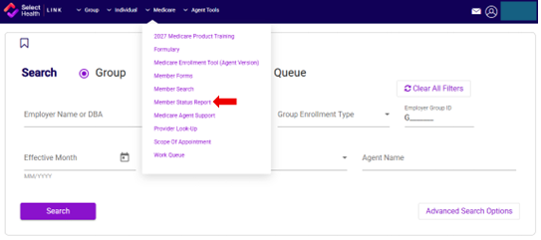
2. Choose a format. Select your preferred report format.
3. Select member statuses. Choose all, active, canceled, deceased, disenrolled, or pending.
4. Set the date range. Select the effective-date range you want to review.
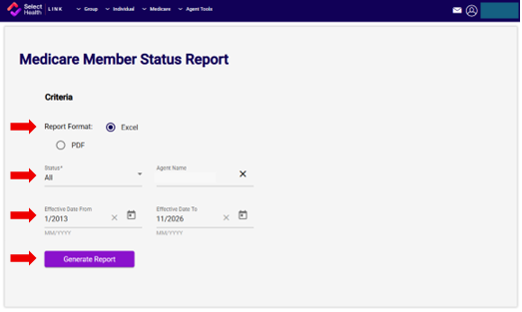
5. Generate the report. Review your selections, then generate the report.
Questions?
If you have questions about how to review your book of business, please reach out to your Sales Account Executive or the Medicare Advantage Agent Support (MAAS) team at 801-442-7320.
Medicare networks are changing for 2027
Select Health’s Medicare plans have historically shared one network. For 2027, that network will be divided into two regional networks:
- Mountain West Network – Serving Utah and Colorado.
- Desert Network – Serving Nevada and extending into Southern Utah.
What this means for Utah and Colorado:
- For Utah and Colorado, operations will remain the same. Agents can continue supporting beneficiaries as they do today. The new Mountain West Network name reflects the regional structure and does not require a change to current sales practices.
What this means for Nevada:
- The Desert Network will serve Nevada and include access to participating providers in Southern Utah. This means members using the Desert Network may also receive in-network care from participating providers in Washington and Iron counties.
Questions?
- If you have questions about the Medicare networks, please reach out to your Sales Account Executive or the Medicare Advantage Agent Support (MAAS) team at 801-442-7320.